Order Number vs Invoice Number: Why Your Shopify Invoices Need Their Own Sequence
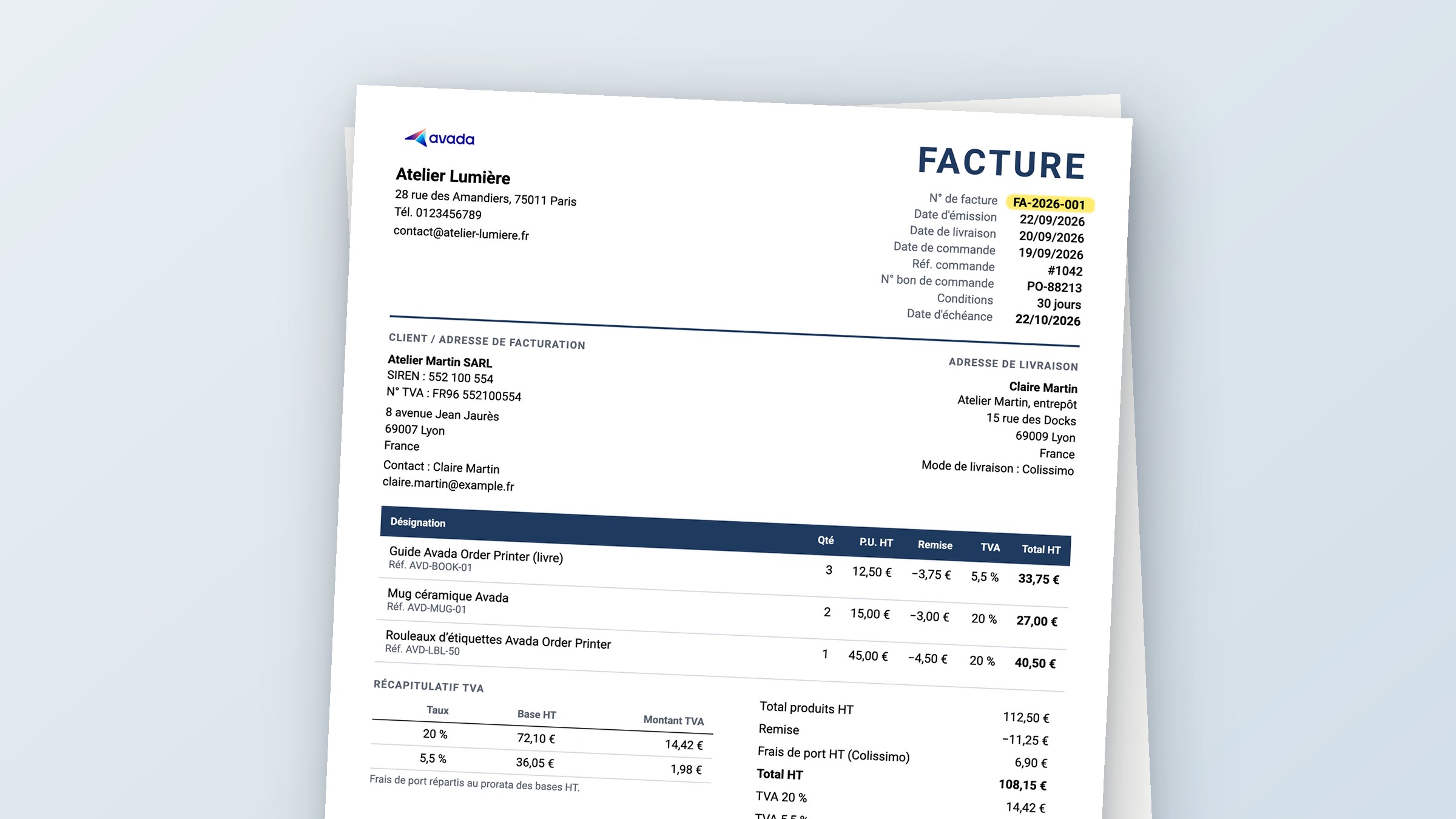
Open any Shopify order and you'll see a number like #1030. Most invoice apps print that number on the invoice, add a prefix, and call it an invoice number. For a lot of stores that works fine. Then an accountant, a tax office or a French customer asks for "a continuous invoice sequence" and the shortcut stops working.
Two numbers, two jobs
Shopify gives every order a number so you can find it, ship it and talk to the customer about it. An invoice number has a different job. It identifies a tax document, and your bookkeeping relies on it.
| Order number | Invoice number | |
|---|---|---|
| Who creates it | Shopify | You (your invoice settings) |
| Example | #1030 | INV-2026-002 |
| Can you change the format? | No | Yes: prefix, year, number of digits |
| What it's for | Finding and fulfilling the order | Accounting and tax records |
Reusing the order number as the invoice number breaks in four places. Switch the prefix from `INV-` to `FA-` and every reprint picks up the new prefix, so the PDF your accountant filed last month no longer matches yours. The invoice, packing slip and refund for one order all carry #1030. Every country shares one sequence, even where a separate series would be allowed and useful. And test or deleted orders still use up order numbers, which leaves holes in your invoice run.
What the rules say in France, Germany and the UK
"EU law requires gapless invoice numbers" gets repeated a lot. It's not quite right, because each country sets its own rules. France, Germany and the UK, the three markets our merchants ask about most, handle it like this.
| France | Germany | United Kingdom | |
|---|---|---|---|
| Unique number | Required | Required | Required (VAT-registered sellers) |
| Unbroken sequence | Required, no gaps or duplicates | Not mandatory | Expected, but gaps are fine if you can explain them |
| Several sequences at once | Only with a real business reason (several billing points, customer groups, channels) | Allowed | Allowed |
| Year in the number | Allowed, numbers must not repeat within the year | Allowed | Allowed |
Sources: French tax guidance BOFiP (BOI-TVA-DECLA-30-20-20-10), German VAT guidance UStAE 14.5, and HMRC guidance for the UK.
France is the strictest of the three. You need one continuous sequence, and selling to customers in another EU country doesn't justify a second one. Germany only asks that each number be unique.
This article is general information, not legal or tax advice. Check with your accountant for your own setup.
An example: a candle shop based in Germany
Lena runs a candle shop from Berlin and sells across the EU. Her invoices used to read `INV-` plus the Shopify order number.
Before: order #1030 gets invoice `INV-1030`. When she rebrands her documents and changes the prefix, reprints of old invoices change too. Her French and German orders share one series built on Shopify's numbering.
After: she sets up two numbering rules:
- All countries: `INV-{{year}}-` with three digits, so the first invoice of 2026 is `INV-2026-001`
- France: `FA-{{year}}-`, so orders billed to France get `FA-2026-001`, `FA-2026-002` and so on
Each invoice number is issued once, when the order is created, and stored with the order. If Lena reprints the invoice in six months, or emails it again, it shows the same number. The order number stays on its own line, so her support team can still search for #1030.
Germany lets her run parallel sequences freely, so this setup is fine for her. If your business is based in France, use one All countries rule instead, so your invoices stay in a single continuous sequence.
How to set it up in Avada PDF Invoice
Invoice numbering is available on the Professional plan and above.
Prefer to watch? The Document numbering guide has a 3-minute video that walks through every step below in the app.
1. Create your first rule. Go to Settings › Document numbering and click Set up. Choose All countries in Applies to.
2. Choose your format. Set a prefix (like `INV-`) and an optional suffix. Add `{{year}}` to the numbering format if you want the year in the number, and pick the number of digits. The preview shows exactly what your next invoice will look like.
3. Set the next number and the reset. Next number is where the counter starts. Reset counter can be Never, Every year or Every month. Never keeps one continuous run, which is the safest choice for audits.
4. Add country rules if you need them. Click Add rule and pick a country. Orders are matched by billing country. If you pick France, the prefix switches to `FA-` for you, and you can change it.
5. Show the number on your invoice. In Document templates, edit your invoice, open Content › Order information and tick Invoice number.
After you save, the Orders page shows an Invoice number column, and each order shows its invoice number in the Notes card.
Common questions
Do my existing orders get an invoice number? No. Numbers are issued only to orders created after you save your first rule. Older orders show "-" and their PDFs leave the invoice number line out, so no order borrows a number it was never issued.
I'm moving from another invoice app. Can I continue my old sequence? Yes. Set Next number to your last invoice number plus one, and the new invoices pick up where the old app stopped.
What happens if I reprint or resend an invoice? It keeps the number it was issued. Changing your prefix later only affects new invoices.
Can I fix one invoice number by hand? Yes. Open the order, click … on the Notes card and choose Edit invoice number. Only that order changes, and invoices you already sent keep the old number. If you edit numbers manually, keeping the sequence clean is up to you.
Do POS orders get numbers too? Yes. They follow the same rules as online orders, based on billing country.
Where to go next
Ready to set it up? Follow the Document numbering guide, video included. If you're unsure what else your invoices need in your country, run one through the free invoice audit.